分类: 服务器相关

服务器日志,服务器相关文档以及服务器新功能公示

  • CSRF在服务器跨域攻击的防御原理

    一、CSRF攻击原理

    什么是CSRF(跨站请求伪造)?

    CSRF是一种让用户在不知情的情况下,以他们的身份执行非本意操作的攻击。

    攻击流程示例:

    1. 用户登录银行网站 bank.com,登录后浏览器保存了会话cookie
    2. 用户访问恶意网站 evil.com
    3. 恶意网站包含一个自动提交的表单
    4. 浏览器会自动带上bank.com的cookie,完成转账操作
    <form action="https://bank.com/transfer" method="POST">
      <input type="hidden" name="amount" value="10000">
      <input type="hidden" name="to" value="hacker">
    </form>
    <script>document.forms[0].submit();</script>
    HTML

    二、CSRF令牌防御机制

    核心思想:引入一个攻击者无法获取的”秘密令牌”

    Flask-WTF的实现:

    1. 令牌生成

    # Flask-WTF内部会为每个会话生成唯一的令牌
    csrf_token = generate_random_string()  # 比如:'abc123xyz'
    session['csrf_token'] = csrf_token  # 存储在服务器端会话中
    Python

    2. 令牌嵌入表单

    <!-- 在表单中嵌入令牌 -->
    <form method="POST">
      <input type="hidden" name="csrf_token" value="{{ csrf_token() }}">
      <!-- csrf_token() 会从session中取出令牌 -->
      <input type="text" name="amount">
    </form>
    HTML

    3. 令牌验证流程

    # Flask-WTF验证逻辑简化版
    def validate_csrf():
        # 1. 获取表单提交的令牌
        form_token = request.form.get('csrf_token')
        
        # 2. 获取服务器存储的令牌
        session_token = session.get('csrf_token')
        
        # 3. 严格比较(防时序攻击)
        if not compare_digest(form_token, session_token):
            abort(403)  # 验证失败
        
        # 4. 每次验证后可选:刷新令牌(防重复提交)
        session['csrf_token'] = generate_random_string()
    Python

    三、为什么能防御CSRF?

    关键点分析:

    1. 同源策略保护令牌

    • 恶意网站evil.com无法读取bank.com页面中的CSRF令牌
    • 浏览器同源策略禁止跨域读取页面内容

    2. 攻击失败示例

    <!-- evil.com的恶意页面 -->
    <form action="https://bank.com/transfer" method="POST">
      <input type="hidden" name="amount" value="10000">
      <input type="hidden" name="to" value="hacker">
      <!-- 攻击者不知道正确的csrf_token值! -->
      <input type="hidden" name="csrf_token" value="????">
    </form>
    <script>document.forms[0].submit();</script>
    HTML

    3. 双重验证机制

    • 第一重:会话cookie(浏览器自动发送)
    • 第二重:CSRF令牌(必须存在于表单数据中)
    • 攻击者只能获取第一重,无法获取第二重

    四、Flask-WTF CSRF的完整配置

    from flask import Flask
    from flask_wtf.csrf import CSRFProtect
    
    app = Flask(__name__)
    app.config['SECRET_KEY'] = 'your-secret-key'  # 必须设置,用于签名session
    app.config['WTF_CSRF_SECRET_KEY'] = 'different-secret-key'  # 可选,专门用于CSRF
    
    csrf = CSRFProtect(app)
    
    # AJAX请求需要额外处理
    @app.after_request
    def set_csrf_cookie(response):
        if request.path.startswith('/api/'):
            response.set_cookie('X-CSRFToken', csrf_token())
        return response
    Python

    五、AJAX请求的CSRF保护

    1. 获取令牌

    // 从meta标签获取(Flask-WTF自动生成)
    var csrf_token = document.querySelector('meta[name="csrf-token"]').content;
    
    // 或从cookie获取
    function getCookie(name) {
        let cookieValue = null;
        if (document.cookie && document.cookie !== '') {
            const cookies = document.cookie.split(';');
            for (let cookie of cookies) {
                cookie = cookie.trim();
                if (cookie.substring(0, name.length + 1) === (name + '=')) {
                    cookieValue = decodeURIComponent(cookie.substring(name.length + 1));
                    break;
                }
            }
        }
        return cookieValue;
    }
    JavaScript

    2. 发送AJAX请求

    // 方法1:放在请求头中
    fetch('/api/transfer', {
        method: 'POST',
        headers: {
            'X-CSRFToken': csrf_token,
            'Content-Type': 'application/json'
        },
        body: JSON.stringify(data)
    });
    
    // 方法2:放在请求体中(表单格式)
    const formData = new FormData();
    formData.append('csrf_token', csrf_token);
    formData.append('amount', 100);
    JavaScript

    六、实践和注意事项

    1. 安全配置

    # 生产环境配置
    app.config.update(
        WTF_CSRF_SSL_STRICT=True,      # 检查Referer头
        WTF_CSRF_TIME_LIMIT=3600,       # 令牌有效期
        WTF_CSRF_HEADERS=['X-CSRFToken', 'X-XSRF-Token']  # 接受的请求头
    )
    Python

    2. 需要豁免CSRF的情况

    @csrf.exempt
    @app.route('/webhook', methods=['POST'])
    def webhook():
        # 第三方webhook通常需要豁免
        pass
    Python

    3. 常见问题

    • 令牌刷新:每次验证后刷新令牌可防重复提交攻击
    • 多个标签页:Flask-WTF默认支持多标签页操作
    • API设计:纯API服务应考虑使用JWT等其他认证方式

    总结

    Flask-WTF的CSRF保护通过”会话绑定令牌”机制,确保:

    1. 每个会话有唯一令牌,攻击者无法猜测
    2. 令牌必须随表单提交,攻击者无法获取
    3. 双重验证机制:会话cookie + CSRF令牌

    这种设计完美解决了CSRF攻击的核心问题:攻击者可以伪造请求,但无法伪造令牌。只要遵循正确的配置,就能有效保护Web应用免受跨站请求伪造攻击。

    Think First

    Thank for watching

    Man is nothing else but what he makes of himself.

    人除了自我塑造之外,什么都不是。

    —— 萨特
  • 校园轻型BBS项目

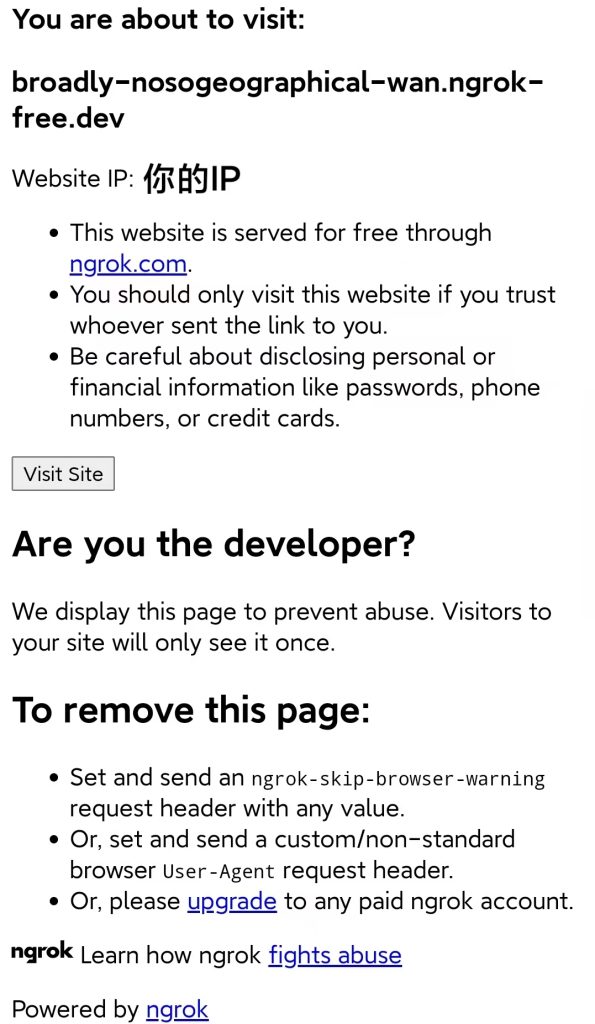
    📌测试连接

    点我传输 或 扫描二维码

    第一次进入会进去这个界面 点击 visit site 继续访问

    🎓 校园轻论坛系统:一个基于 Flask 的匿名交流社区

    项目 GitHub 链接:点我传输

    📌 项目简介

    这是一个为校园场景设计的轻量级匿名交流论坛系统,使用 Python + Flask 构建,支持多板块管理、内容审核、用户认证、投票机制等功能,适用于校园二手交易、失物招领、活动发布、匿名吐槽等常见需求。

    ✨ 核心功能概览

    1. 多板块分类管理

    系统内置多个预设板块,每个板块可独立配置:

    • 常规讨论、二手市场、代取拼团、失物招领、线下活动、吐槽、Q/A、广告等
    • 支持自定义内容留存时间、匿名发帖、评论开关、审核机制等

    2. 用户角色与权限系统

    • 游客:仅可浏览部分内容
    • 注册用户:可发帖、评论、点赞
    • 认证用户:享有更高发帖权限
    • 审核员:可审核内容、投票封禁用户
    • 管理员:全站管理、置顶、维护模式开关

    3. 内容审核与投票机制

    • 发帖审核:部分板块需审核后才公开
    • 删除投票:用户可举报不良内容,达到阈值后自动进入待删除状态
    • 点赞系统:用户可为优质内容点赞

    4. 用户认证与安全

    • 手机号注册 + 密码强度校验
    • 每 IP 仅可注册一个账号
    • 昵称修改限制(30天一次)
    • 用户封禁机制(管理员直接封禁 / 审核员投票封禁)

    5. 管理员后台

    • 用户管理(认证、封禁、角色设置)
    • 内容审核队列(待审核、待删除)
    • 系统设置(一键开启维护模式)
    • 操作日志审计

    6. 媒体与格式支持

    • 图片上传并自动转为 WebP 格式(可选)
    • 内容字数限制(50,000字以内)
    • 月度发帖次数限制(按板块设置)

    7. 特色功能

    • 匿名发帖:部分板块支持匿名发布
    • 标记解决:适用于问答、求助类帖子
    • 广告随机插入:在特定板块中随机展示广告内容
    • 维护模式:一键停服,仅管理员可访问

    🛠️ 技术栈

    • 后端:Flask + SQLAlchemy + Flask-Login
    • 数据库:SQLite / PostgreSQL(可扩展)
    • 前端:Jinja2 模板 + Bootstrap
    • 图片处理:Pillow(WebP 转换)

    📦 使用场景

    失物招领与寻物启事

    大学校园内部交流平台

    班级或社团信息发布

    二手物品交易与拼团

    匿名反馈与吐槽

    It is not because things are difficult that we do not dare; it is because we do not dare that they are difficult.

    并不是因为事情困难我们不敢做,而是因为我们不敢做事情才变得困难。

    —— 塞涅卡
  • wordpress 简码-文字展示

    AI真的太好用了你知道吗?

    源码


    <?php
    // 在主题的functions.php文件中添加以下代码
    
    // 注册所有文字效果简码
    function register_text_effects_shortcodes() {
        // 渐变色文字 - 支持嵌套版本
        add_shortcode('gradient_text_n', 'gradient_text_nested_shortcode');
        
        // 打字机效果 - 支持嵌套版本
        add_shortcode('typewriter_text_n', 'typewriter_text_nested_shortcode');
        
        // 文字阴影效果 - 支持嵌套版本
        add_shortcode('shadow_text_n', 'shadow_text_nested_shortcode');
        
        // 霓虹灯文字 - 支持嵌套版本
        add_shortcode('neon_text_n', 'neon_text_nested_shortcode');
        
        // 3D立体文字 - 支持嵌套版本
        add_shortcode('text_3d_n', 'text_3d_nested_shortcode');
        
        // 文字高亮效果 - 支持嵌套版本
        add_shortcode('highlight_text_n', 'highlight_text_nested_shortcode');
    }
    add_action('init', 'register_text_effects_shortcodes');
    
    // 渐变色文字简码(嵌套版本)
    function gradient_text_nested_shortcode($atts, $content = null) {
        $atts = shortcode_atts(array(
            'color1' => '#ff0000',
            'color2' => '#0000ff',
            'size' => '24px',
            'align' => 'center'
        ), $atts);
        
        $id = 'gradient-text-' . uniqid();
        
        $output = '<style>
            #' . $id . ' {
                font-size: ' . $atts['size'] . ';
                font-weight: bold;
                background: linear-gradient(45deg, ' . $atts['color1'] . ', ' . $atts['color2'] . ');
                -webkit-background-clip: text;
                -webkit-text-fill-color: transparent;
                text-align: ' . $atts['align'] . ';
                margin: 10px 0;
                display: inline-block;
            }
        </style>';
        
        $output .= '<span id="' . $id . '">' . do_shortcode($content) . '</span>';
        
        return $output;
    }
    
    // 打字机效果简码(嵌套版本)
    function typewriter_text_nested_shortcode($atts, $content = null) {
        $atts = shortcode_atts(array(
            'color' => '#333',
            'size' => '24px',
            'cursor' => 'true'
        ), $atts);
        
        $id = 'typewriter-' . uniqid();
        
        $output = '<style>
            #' . $id . ' {
                font-size: ' . $atts['size'] . ';
                color: ' . $atts['color'] . ';
                font-family: monospace;
                overflow: hidden;
                border-right: ' . ($atts['cursor'] == 'true' ? '3px solid ' . $atts['color'] : 'none') . ';
                white-space: nowrap;
                margin: 0;
                letter-spacing: 2px;
                animation: typing 3.5s steps(40, end), blink-caret .75s step-end infinite;
                display: inline-block;
            }
            
            @keyframes typing {
                from { width: 0 }
                to { width: 100% }
            }
            
            @keyframes blink-caret {
                from, to { border-color: transparent }
                50% { border-color: ' . $atts['color'] . '; }
            }
        </style>';
        
        $output .= '<span id="' . $id . '">' . do_shortcode($content) . '</span>';
        
        return $output;
    }
    
    // 文字阴影效果简码(嵌套版本)
    function shadow_text_nested_shortcode($atts, $content = null) {
        $atts = shortcode_atts(array(
            'color' => '#333',
            'shadow_color' => '#aaa',
            'size' => '32px',
            'blur' => '10px'
        ), $atts);
        
        $id = 'shadow-text-' . uniqid();
        
        $output = '<style>
            #' . $id . ' {
                font-size: ' . $atts['size'] . ';
                color: ' . $atts['color'] . ';
                text-shadow: 2px 2px ' . $atts['blur'] . ' ' . $atts['shadow_color'] . ';
                font-weight: bold;
                margin: 0;
                display: inline-block;
            }
        </style>';
        
        $output .= '<span id="' . $id . '">' . do_shortcode($content) . '</span>';
        
        return $output;
    }
    
    // 霓虹灯文字简码(嵌套版本)
    function neon_text_nested_shortcode($atts, $content = null) {
        $atts = shortcode_atts(array(
            'color' => '#fff',
            'glow_color' => '#0ff',
            'size' => '40px'
        ), $atts);
        
        $id = 'neon-text-' . uniqid();
        
        $output = '<style>
            #' . $id . ' {
                font-size: ' . $atts['size'] . ';
                color: ' . $atts['color'] . ';
                text-shadow: 0 0 5px ' . $atts['color'] . ', 0 0 10px ' . $atts['color'] . ', 0 0 20px ' . $atts['glow_color'] . ', 0 0 40px ' . $atts['glow_color'] . ', 0 0 80px ' . $atts['glow_color'] . ';
                font-weight: bold;
                margin: 0;
                display: inline-block;
                animation: neon-flicker 2s infinite alternate;
            }
            
            @keyframes neon-flicker {
                0%, 18%, 22%, 25%, 53%, 57%, 100% {
                    text-shadow: 0 0 5px ' . $atts['color'] . ', 0 0 10px ' . $atts['color'] . ', 0 0 20px ' . $atts['glow_color'] . ', 0 0 40px ' . $atts['glow_color'] . ', 0 0 80px ' . $atts['glow_color'] . ';
                }
                20%, 24%, 55% {
                    text-shadow: none;
                }
            }
        </style>';
        
        $output .= '<span id="' . $id . '">' . do_shortcode($content) . '</span>';
        
        return $output;
    }
    
    // 3D立体文字简码(嵌套版本)
    function text_3d_nested_shortcode($atts, $content = null) {
        $atts = shortcode_atts(array(
            'color' => '#3498db',
            'depth' => '5',
            'size' => '36px'
        ), $atts);
        
        $id = 'text-3d-' . uniqid();
        
        $output = '<style>
            #' . $id . ' {
                font-size: ' . $atts['size'] . ';
                color: ' . $atts['color'] . ';
                font-weight: bold;
                text-transform: uppercase;
                position: relative;
                margin: 0;
                display: inline-block;
                letter-spacing: 2px;
                transform: perspective(500px) rotateX(25deg);
            }
            
            #' . $id . ':before {
                content: "' . esc_attr(do_shortcode($content)) . '";
                position: absolute;
                top: ' . $atts['depth'] . 'px;
                left: 0;
                color: rgba(0,0,0,0.2);
                z-index: -1;
                transform: skewX(45deg) translateZ(-10px);
                filter: blur(2px);
                width: 100%;
            }
        </style>';
        
        $output .= '<span id="' . $id . '">' . do_shortcode($content) . '</span>';
        
        return $output;
    }
    
    // 文字高亮效果简码(嵌套版本)
    function highlight_text_nested_shortcode($atts, $content = null) {
        $atts = shortcode_atts(array(
            'color' => '#ffeb3b',
            'text_color' => '#000',
            'padding' => '5px 10px'
        ), $atts);
        
        $id = 'highlight-text-' . uniqid();
        
        $output = '<style>
            #' . $id . ' {
                background-color: ' . $atts['color'] . ';
                color: ' . $atts['text_color'] . ';
                padding: ' . $atts['padding'] . ';
                border-radius: 4px;
                display: inline-block;
                font-weight: bold;
                position: relative;
                overflow: hidden;
            }
            
            #' . $id . ':after {
                content: "";
                position: absolute;
                top: 0;
                left: -100%;
                width: 100%;
                height: 100%;
                background: linear-gradient(90deg, transparent, rgba(255,255,255,0.4), transparent);
                animation: shine 3s infinite;
            }
            
            @keyframes shine {
                0% { left: -100%; }
                100% { left: 100%; }
            }
        </style>';
        
        $output .= '<span id="' . $id . '">' . do_shortcode($content) . '</span>';
        
        return $output;
    }
    PHP

    使用指南


    WordPress文字效果演示

    WordPress文字效果简码演示

    基本效果展示

    渐变色文字

    这是渐变色文字效果
    [gradient_text_n color1=”#ff0000″ color2=”#0000ff”]这是渐变色文字效果[/gradient_text_n]

    打字机效果

    这是打字机效果文字
    [typewriter_text_n]这是打字机效果文字[/typewriter_text_n]

    霓虹灯效果

    霓虹灯文字
    [neon_text_n color=”#fff” glow_color=”#0ff”]霓虹灯文字[/neon_text_n]

    嵌套效果示例

    渐变色 + 高亮嵌套

    这是渐变色文字,里面包含高亮效果
    [gradient_text_n color1=”#ff0000″ color2=”#0000ff”]这是渐变色文字,里面包含[highlight_text_n]高亮效果[/highlight_text_n][/gradient_text_n]

    阴影 + 打字机嵌套

    阴影文字中的打字机效果
    [shadow_text_n shadow_color=”#aaa”]阴影文字中的[typewriter_text_n]打字机效果[/typewriter_text_n][/shadow_text_n]

    多重嵌套效果

    渐变色中的霓虹灯高亮效果
    [gradient_text_n color1=”#ff0000″ color2=”#0000ff”]渐变色中的[neon_text_n]霓虹灯[/neon_text_n]和[highlight_text_n]高亮[/highlight_text_n]效果[/gradient_text_n]

    使用说明

    • 将PHP代码添加到主题的functions.php文件中
    • 在文章或页面中使用相应的简码
    • 所有嵌套版本简码名称以”_n”结尾
    • 支持任意层次的嵌套组合
    • 每个效果都有可自定义的参数