分类: 编程

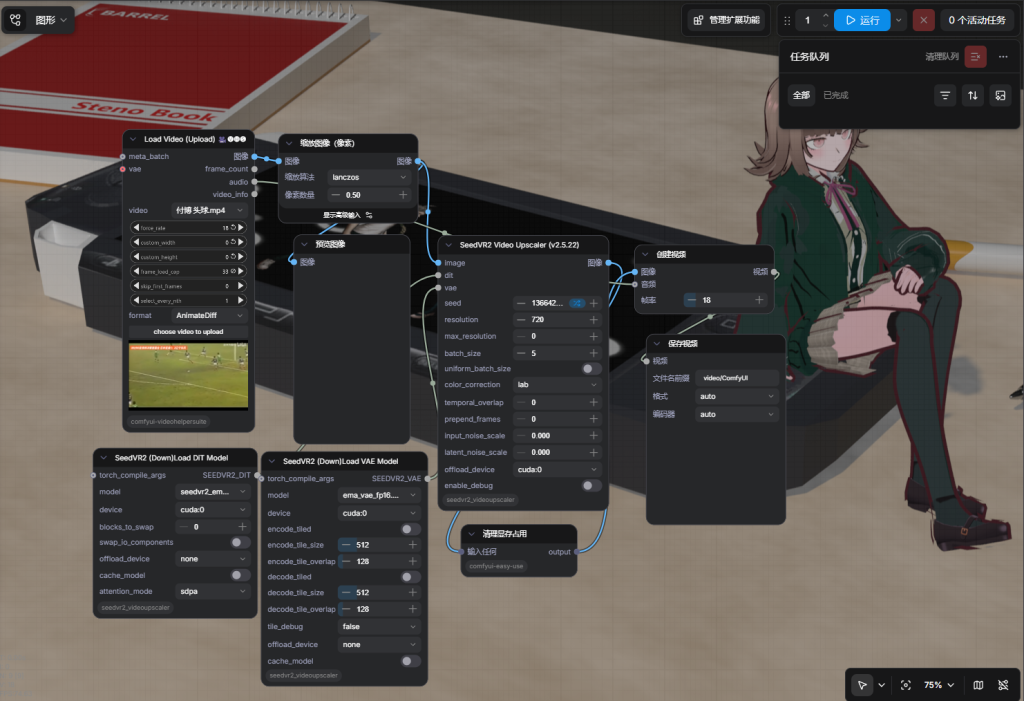
  • ComfyUI-SEEDVR2

    ComfyUI-SEEDVR2

    功能:修复视频像素

    “一句有哲理的话”

    跑了一下午,40min才能修1s 修了跟没修差不多…
    可能是我的电脑显卡还是太垃圾了

    Life begins on the other side of despair.

    生活在绝望的另一端开始。

    —— 萨特

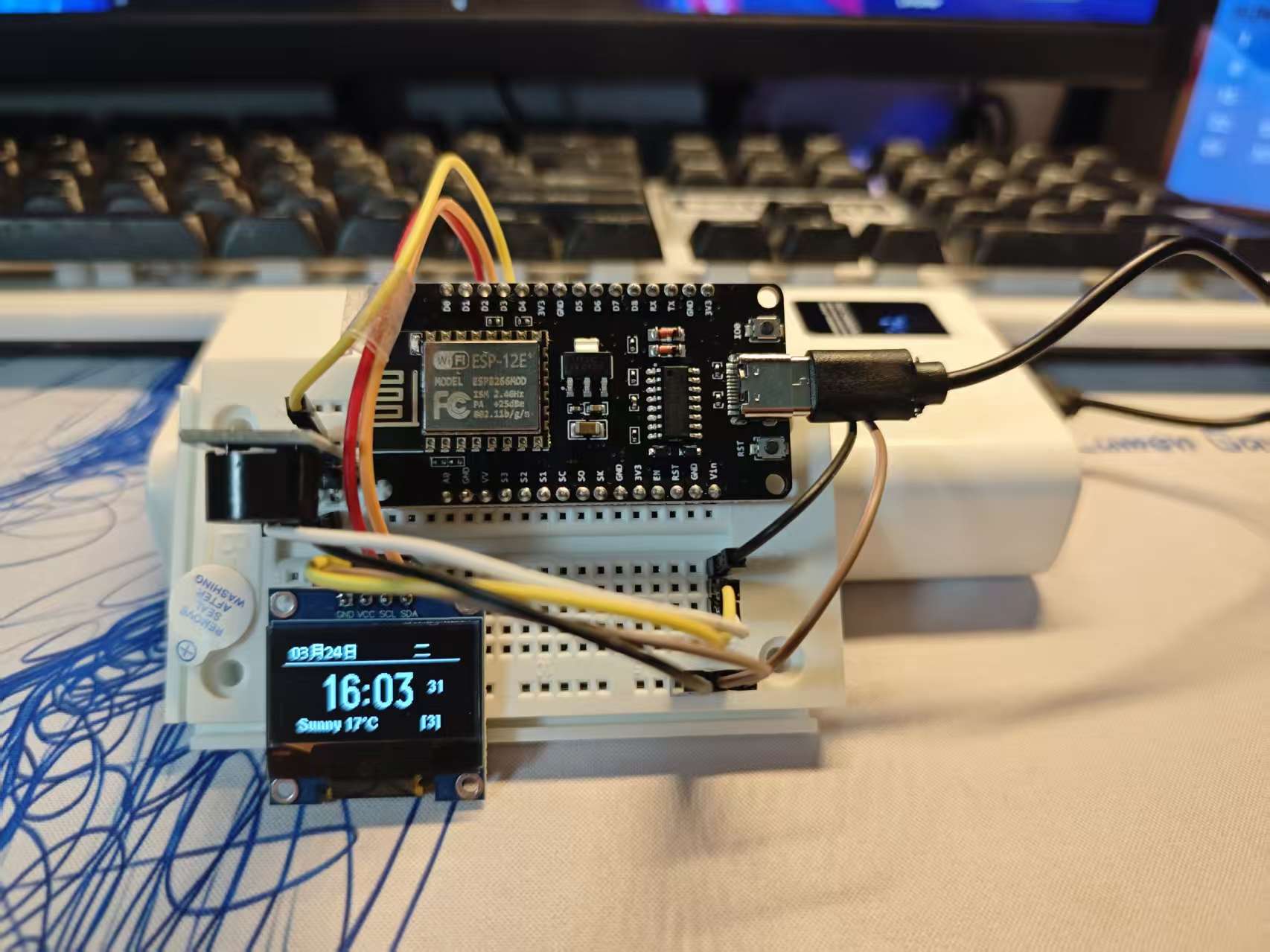
  • ESP8266电子时钟

    ESP8266电子时钟

    功能:自定义API访问
    显示天气
    显示时间

    材料
    • 一块大小不符合的面包板
    • NodeMCU ESP-12E(ESP8266 WiFi 开发板)
    • 0.96 寸 I2C 接口 SSD1306 OLED 显示屏
    • 有源蜂鸣器
    • 几根杜邦线
    arduino 代码
    #include <U8g2lib.h>
    #include <Wire.h>
    #include <ESP8266WiFi.h>
    #include <ESP8266HTTPClient.h>
    #include <ArduinoJson.h>
    
    // ==================== OLED配置 ====================
    U8G2_SSD1306_128X64_NONAME_F_HW_I2C u8g2(U8G2_R0, /* reset=*/ U8X8_PIN_NONE, /* clock=*/ 5, /* data=*/ 4);
    // ==================== 蜂鸣器配置 ====================
    #define BUZZER_PIN 0  // D3 (GPIO0)
    
    
    // ==================== WiFi配置 ====================
    const char* ssid = "N/A";
    const char* password = "N/A";
    
    // ==================== API配置 ====================
    const char* timeUrl = "N/A";
    const char* serverUrl = "N/A";
    
    // 心知天气配置(免费注册:https://www.seniverse.com/)
    const char* xinzhiKey = "N/A";
    const char* city = "N/A";
    const char* weatherUrl = "https://api.seniverse.com/v3/weather/now.json";
    
    WiFiClientSecure client;
    
    // ==================== 全局变量 ====================
    int currentHour = 0;
    int currentMinute = 0;
    int currentSecond = 0;
    int currentWeekday = 0;
    String currentDateFormatted = "";
    
    // 天气
    String weatherText = "";
    String weatherTemp = "";
    
    // 通知
    String notifications[30];
    int notificationCount = 0;
    int currentNotificationIndex = 0;
    
    // 定时
    unsigned long lastTimeUpdate = 0;
    unsigned long lastWeatherUpdate = 0;
    unsigned long lastDataUpdate = 0;
    unsigned long lastModeSwitch = 0;
    
    int displayMode = 0;  // 0:时间界面, 1:通知界面
    bool notificationJustShown = false;
    
    // ==================== 辅助函数 ====================
    String getWeekdayCN(int w) {
      String weekdays[] = {"周一", "周二", "周三", "周四", "周五", "周六", "周日"};
      if (w >= 0 && w <= 6) return weekdays[w];
      return "周一";
    }
    
    String getWeatherCN(String weather) {
      if (weather.indexOf("Clear") >= 0) return "晴";
      if (weather.indexOf("Cloud") >= 0) return "多云";
      if (weather.indexOf("Overcast") >= 0) return "阴";
      if (weather.indexOf("Light Rain") >= 0) return "小雨";
      if (weather.indexOf("Moderate Rain") >= 0) return "中雨";
      if (weather.indexOf("Heavy Rain") >= 0) return "大雨";
      if (weather.indexOf("Rain") >= 0) return "雨";
      if (weather.indexOf("Snow") >= 0) return "雪";
      if (weather.indexOf("Fog") >= 0) return "雾";
      return weather;
    }
    
    void beepLight() {
      digitalWrite(BUZZER_PIN, LOW);
      delay(80);
      digitalWrite(BUZZER_PIN, HIGH);
    }
    
    // ==================== 获取数据 ====================
    void updateTime() {
      if (WiFi.status() != WL_CONNECTED) return;
      
      HTTPClient https;
      client.setInsecure();
      https.setTimeout(5000);
      
      if (!https.begin(client, timeUrl)) return;
      
      int httpCode = https.GET();
      if (httpCode == HTTP_CODE_OK) {
        String payload = https.getString();
        
        DynamicJsonDocument doc(512);
        deserializeJson(doc, payload);
        
        currentHour = doc["hour"];
        currentMinute = doc["minute"];
        currentWeekday = doc["weekday"];
        
        String timeStr = doc["time"].as<String>();
        if (timeStr.length() >= 19) {
          currentSecond = timeStr.substring(17, 19).toInt();
        }
        
        String dateStr = doc["date"].as<String>();
        if (dateStr.length() >= 10) {
          String month = dateStr.substring(5, 7);
          String day = dateStr.substring(8, 10);
          currentDateFormatted = month + "月" + day + "日";
        }
      }
      https.end();
    }
    
    void updateWeather() {
      if (WiFi.status() != WL_CONNECTED) return;
      if (String(xinzhiKey).length() == 0) return;
      
      String url = String(weatherUrl) + "?key=" + xinzhiKey + "&location=" + city + "&language=en&unit=c";
      
      HTTPClient https;
      client.setInsecure();
      https.setTimeout(5000);
      
      if (!https.begin(client, url)) return;
      
      int httpCode = https.GET();
      if (httpCode == HTTP_CODE_OK) {
        String payload = https.getString();
        
        DynamicJsonDocument doc(1024);
        deserializeJson(doc, payload);
        
        if (doc.containsKey("results")) {
          JsonObject now = doc["results"][0]["now"];
          weatherText = now["text"].as<String>();
          float temp = now["temperature"];
          weatherTemp = String(temp, 0);
        }
      }
      https.end();
    }
    
    void fetchNotifications() {
      if (WiFi.status() != WL_CONNECTED) return;
      
      HTTPClient https;
      client.setInsecure();
      https.setTimeout(10000);
      
      if (!https.begin(client, serverUrl)) return;
      
      int httpCode = https.GET();
      if (httpCode == HTTP_CODE_OK) {
        String payload = https.getString();
        
        DynamicJsonDocument doc(4096);
        deserializeJson(doc, payload);
        
        if (doc["status"] == "success") {
          notificationCount = 0;
          JsonArray notificationsArr = doc["notifications"];
          for (JsonObject n : notificationsArr) {
            if (notificationCount < 30) {
              notifications[notificationCount] = n["content"].as<String>();
              notificationCount++;
            }
          }
        }
      }
      https.end();
    }
    
    // ==================== 手表界面 ====================
    void displayWatchFace() {
      u8g2.firstPage();
      do {
        // ========== 顶部区域 ==========
        u8g2.setFont(u8g2_font_wqy12_t_chinese3);
        u8g2.drawHLine(0, 15, 128);  // 顶部分割线
        
        // 日期(左上角)
        u8g2.setCursor(5, 12);
        if (currentDateFormatted.length() > 0) {
          u8g2.print(currentDateFormatted);
        } else {
          u8g2.print("03月24日");
        }
        
        // 星期(右上角)
        u8g2.setCursor(95, 12);
        u8g2.print(getWeekdayCN(currentWeekday));
        
        // ========== 中间时间区域 ==========
        // 时间往下移(从y=42移到y=48)
        u8g2.setFont(u8g2_font_logisoso24_tf);
        u8g2.setCursor(25, 48);
        char timeBuf[6];
        sprintf(timeBuf, "%02d:%02d", currentHour, currentMinute);
        u8g2.print(timeBuf);
        
        // 秒数(放在时间右侧)
        u8g2.setFont(u8g2_font_helvB08_tf);
        u8g2.setCursor(105, 38);
        char secBuf[3];
        sprintf(secBuf, "%02d", currentSecond);
        u8g2.print(secBuf);
        
        // ========== 底部区域 ==========
        
        // 底部文字(放在线下方,y=63)
        u8g2.setCursor(10, 63);
        if (weatherText.length() > 0 && weatherTemp.length() > 0) {
          u8g2.print(getWeatherCN(weatherText));
          u8g2.print(" ");
          u8g2.print(weatherTemp);
          u8g2.print("°C");
        } else if (String(xinzhiKey).length() > 0) {
          u8g2.print("天气加载中");
        } else {
          u8g2.print("WiFi:");
          u8g2.print(WiFi.RSSI());
          u8g2.print("dBm");
        }
        
        // 通知数量(右侧)
        if (notificationCount > 0) {
          u8g2.setCursor(100, 63);
          u8g2.print("[");
          u8g2.print(notificationCount);
          u8g2.print("]");
        }
        
      } while (u8g2.nextPage());
    }
    
    // ==================== 通知界面 ====================
    void displayNotification() {
      u8g2.firstPage();
      do {
        u8g2.setFont(u8g2_font_wqy12_t_chinese3);
        
        u8g2.drawHLine(0, 15, 128);
        u8g2.setCursor(45, 12);
        u8g2.print("通 知");
        u8g2.drawHLine(0, 22, 128);
        
        if (notificationCount > 0 && currentNotificationIndex < notificationCount) {
          String content = notifications[currentNotificationIndex];
          
          int lineHeight = 12;
          int startPos = 0;
          int lines = 0;
          
          while (startPos < content.length() && lines < 3) {
            int endPos = startPos + 18;
            if (endPos > content.length()) endPos = content.length();
            
            u8g2.setCursor(5, 32 + lines * lineHeight);
            u8g2.print(content.substring(startPos, endPos));
            
            startPos = endPos;
            lines++;
          }
          
          u8g2.setCursor(100, 63);
          u8g2.print(currentNotificationIndex + 1);
          u8g2.print("/");
          u8g2.print(notificationCount);
          
        } else {
          u8g2.setCursor(35, 40);
          u8g2.print("暂无通知");
        }
        
        
      } while (u8g2.nextPage());
    }
    
    // ==================== 初始化 ====================
    void setup() {
      Serial.begin(115200);
      delay(100);
      
      pinMode(BUZZER_PIN, OUTPUT);
      digitalWrite(BUZZER_PIN, HIGH);
      
      u8g2.begin();
      u8g2.enableUTF8Print();
      u8g2.setFont(u8g2_font_wqy12_t_chinese3);
      
      u8g2.firstPage();
      do {
        u8g2.setCursor(35, 30);
        u8g2.print("连接WiFi");
      } while (u8g2.nextPage());
      
      WiFi.begin(ssid, password);
      int attempts = 0;
      while (WiFi.status() != WL_CONNECTED && attempts < 25) {
        delay(500);
        Serial.print(".");
        attempts++;
      }
      
      if (WiFi.status() == WL_CONNECTED) {
        Serial.println("\nWiFi已连接");
        u8g2.firstPage();
        do {
          u8g2.setCursor(40, 30);
          u8g2.print("WiFi已连");
        } while (u8g2.nextPage());
        delay(1000);
      }
      
      client.setInsecure();
      
      updateTime();
      updateWeather();
      fetchNotifications();
      
      beepLight();
    }
    
    // ==================== 主循环 ====================
    void loop() {
      unsigned long now = millis();
      
      if (now - lastTimeUpdate >= 1000) {
        updateTime();
        lastTimeUpdate = now;
      }
      
      if (now - lastWeatherUpdate >= 300000) {
        updateWeather();
        lastWeatherUpdate = now;
      }
      
      // 每15分钟检查通知
      if (now - lastDataUpdate >= 900000) {
        fetchNotifications();
        lastDataUpdate = now;
        
        if (notificationCount > 0) {
          displayMode = 1;
          lastModeSwitch = now;
          currentNotificationIndex = 0;
          notificationJustShown = true;
          beepLight();
        }
      }
      
      // 通知界面显示10秒后切回
      if (displayMode == 1 && notificationJustShown) {
        if (now - lastModeSwitch >= 10000) {
          displayMode = 0;
          notificationJustShown = false;
          lastModeSwitch = now;
        }
      }
      
      // 通知界面自动翻页
      if (displayMode == 1 && notificationCount > 0 && notificationJustShown) {
        static unsigned long lastNotiSwitch = 0;
        if (now - lastNotiSwitch >= 3000) {
          currentNotificationIndex = (currentNotificationIndex + 1) % notificationCount;
          lastNotiSwitch = now;
        }
      }
      
      if (displayMode == 0) {
        displayWatchFace();
      } else {
        displayNotification();
      }
      
      delay(50);
    }
    C++

    “记住他人名字带给他人被记住的感觉是这个时代所稀缺的,因为效率至上的时代,每个人都忽视了彼此包括自己”

    Making someone feel remembered just by knowing their name—that’s something rare in today’s world. In an era that prioritizes efficiency, people often neglect others, and even themselves.

    What lies behind us and what lies before us are tiny matters compared to what lies within us.

    与我们内心的事物相比,身后和眼前的事物都是微不足道的。

    —— 爱默生

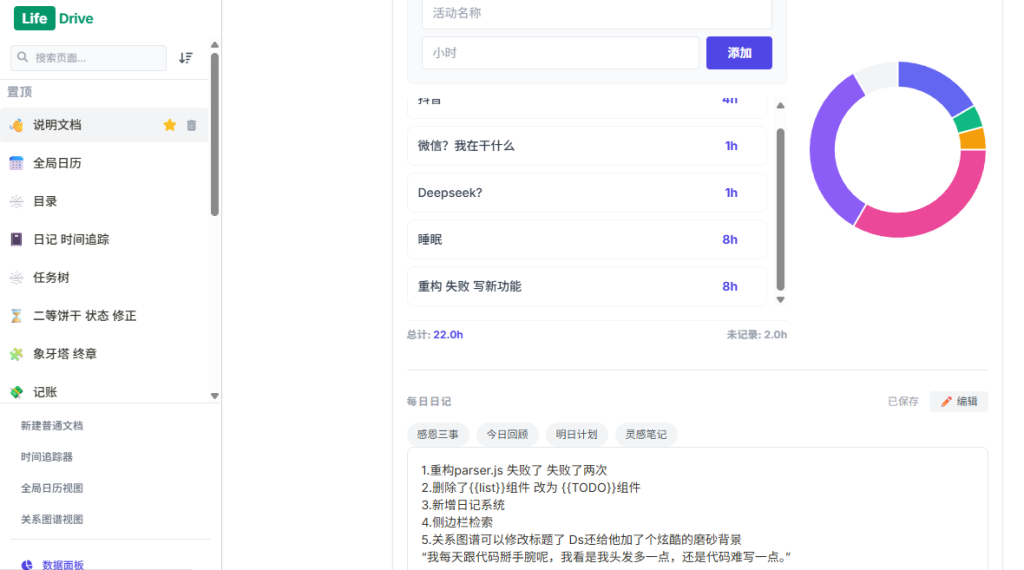
  • LifeDrive-个人计划&记录系统

    今天是昨天的明天

    写了个轻量级个人知识库系统,融合了笔记、时间追踪、关系图谱和日历视图。它支持类 Obsidian 的 [[@页面链接]] 和 [[标签]] 语法,内置待办清单、提醒组件和 Markdown 渲染。

    Notiobsidian(Nobsidian)作为开源版本


    🌐 Notiobsidian

    Stars
    Forks
    Issues
    MIT License
    Python
    Flask
    Local First
    Notion Style


    本地优先 · 可编程 · Agent-ready 的下一代个人工作空间

    Notiobsidian

    把 Notion 的交互美学 + Obsidian 的本地自由 + AI Agent 原生接口 揉在一起
    一个完全自托管、可编程、跑在你电脑上的个人第二大脑(目前已是我本人的主力生产力工具)

    ✨ 核心特性(已实现 & 日常在用)

    • 本地优先 + Markdown 文件存储 —— 所有数据就是你硬盘上的文件,永不锁仓
    • Notion 风格块式编辑器 —— 支持拖拽、/命令、富媒体、数据库视图雏形
    • 自定义语法糖 —— {{TODO}}、{{image}}、{{video}}、{{calc}}、{{notice}} 等扩展块
    • 变量系统 & 数据面板 —— 记录习惯/开销/体重等数值,自动生成折线图/饼图/分布图
    • 每日追踪器 —— 时间统计 + 情绪日记 + 模板一键插入(我每天写日记都在这里)
    • 全局日历视图 —— 从笔记里自动提取 @2026-02-18 [会议] 事件,支持 ICS 导入导出
    • 知识图谱 —— vis-network 驱动,拖拽节点、按标签分组、cabinet 文件柜
    • 实时提醒 & 桌面通知 —— WebSocket + 浏览器通知(定时/间隔/周几都支持)
    • 极简自托管 —— 一条命令 python Notiobsidian.py 就能跑
    • 暗黑模式友好 + Tailwind 美化(手机也能凑合看)

    📸 截图预览

    Sidebar & Dashboard
    Daily Tracker with Charts
    Knowledge Graph View
    Calendar Events

    🚀 快速开始(3 分钟跑起来)

    1. 克隆仓库
       git clone https://github.com/NanamiChiaki-7/Notiobsidian.git
       cd Notiobsidian
    Bash
    1. 安装依赖(Python 3.8+)
       pip install -r requirements.txt
    Bash
    1. 启动
       python Notiobsidian.py
    Bash

    → 默认监听 http://0.0.0.0:5004

    1. 登录(首次使用)
    • 用户名:admin
    • 密码:PASSWORD(启动后立刻去改!见下方安全提示)
    1. 开始使用:浏览器打开 http://localhost:5004 即可看到欢迎页和示例内容

    生产建议

    • 用环境变量设置 SECRET_KEY 和密码
    • --host 0.0.0.0 --port 你的端口 或用 gunicorn / uvicorn 部署
    • 数据文件:nation_pro_v3.db(SQLite),记得定期备份!

    🛤️ 路线图(2026 计划)

    • [x] 基本笔记 + TODO + 日历 + 图谱 + 追踪器
    • [ ] 完善图片/视频上传 & 拖拽排序
    • [ ] 提醒真正定时推送(apscheduler / 系统托盘 /手机APP FCM)
    • [ ] Agent 接口(Python 函数暴露给 LLM 调用)
    • [ ] 移动端响应式优化
    • [ ] 主题切换(光暗 + 自定义配色)
    • [ ] 数据导入(Notion / Obsidian / Markdown 文件夹)
    • [ ] Docker 一键部署

    欢迎 PR 加速这些功能!

    🤝 贡献

    欢迎 issue、PR、想法!

    1. Fork → branch
    2. 改动后加测试(如果有)→ 提交清晰 commit
    3. 发 PR,描述清楚做了什么

    喜欢就点个 ⭐ 支持一下~


    Last updated: February 2026 · 最后更新:2026年2月

    I am no bird; and no net ensnares me: I am a free human being with an independent will.

    我不是鸟,也没有网能捕捉我:我是一个有独立意志的自由人。

    —— 《简·爱》夏洛蒂·勃朗特

  • 多项目挂载单一域名下子域名反代问题处理

    🏆 BUG本质归档:多项目同域名反代下的「路径双重转义」问题


    🎯 一句话总结

    静态资源请求被错误地当成了动态路由处理,导致路径被二次编码。


    🔍 问题根源拓扑

    你的预期:
    浏览器请求 /LifeDrive/static/css/style.css 
        → Nginx 静态 location 
        → 直接读硬盘文件 ✅
    
    实际发生:
    浏览器请求 /LifeDrive/static/css/style.css
        → Nginx 无静态 location(或被覆盖)
        → 转发给 Flask 代理
        → Flask 的 ReverseProxied 剥离 /LifeDrive
        → Flask 收到 /static/css/style.css
        → Flask 把它当作路由去找 @app.route('/static/...')
        → 找不到,返回 404 ❌

    触发条件(三要素缺一不可)

    1. Nginx 静态 location 缺失/写错/顺序不对
    • ^~ /Project/static/ 没写
    • 或写在代理 location 后面
    • alias 路径错误/少斜杠
    1. Flask 启用了 ReverseProxied
    • 正确剥离了前缀
    • 但把静态请求也剥离了
    1. HTML 用了 url_for 生成静态路径
       <!-- 这会让静态请求也经过 Flask 路由系统 -->
       <link href="{{ url_for('static', filename='css/style.css') }}">

    url_for('static') → 生成 /LifeDrive/static/css/style.css → 同上死循环


    解决方案对比

    方案静态文件处理动态路由HTML写法适用场景
    ❌ 全代理Flask处理Flask处理url_for单项目,无Nginx静态
    ✅ 组合拳Nginx直出Flask处理写死路径多项目同域名,性能最优
    ⚠️ 全直出Nginx直出Nginx直出写死路径纯静态站

    你最终选的是「组合拳」——工业标准做法。


    📚 经验法则(以后照着做)

    法则1:Nginx 静态 location 必须写在代理前面

    # ✅ 正确顺序
    location ^~ /Project/static/ { ... }  # 1. 精确匹配优先
    location /Project/ { ... }            # 2. 模糊匹配在后

    法则2:静态文件用写死路径,动态链接用 url_for

    <!-- ✅ 静态资源:直接写死,不走 Flask -->
    <link href="/Project/static/css/style.css">
    
    <!-- ✅ 动态链接:用 url_for,自动加前缀 -->
    <a href="{{ url_for('view_page', id=1) }}">

    法则3:BASE_PATH 是给动态路由用的,静态文件不要

    # ✅ 只有 Flask 需要知道
    export BASE_PATH=/Project
    
    # ❌ Nginx 静态 location 完全不需要
    # alias 直接写绝对路径即可

    法则4:新项目部署检查清单

    1. [ ] Nginx 加静态 location(^~ /项目名/static/
    2. [ ] Nginx 加代理 location(/项目名/
    3. [ ] 静态写在代理前面
    4. [ ] HTML 里写死 /项目名/static/xxx
    5. [ ] Flask 启动前 export BASE_PATH=/项目名
    6. [ ] 测试静态文件直出(应200)
    7. [ ] 测试动态页面(应200)

    🎖️ 本次BUG修复贡献者

    问题发现:浏览器控制台 404
    定位过程:curl → Nginx 404 → 检查 alias → 发现少斜杠
    深层原因:发现静态请求进了 Flask
    解决方案:Nginx 静态直出 + HTML写死路径
    最终验证:静态文件 200,动态页面 200,完美

    耗时:一下午
    收获:多项目反代的标准模式固化


    📌 以后再也不犯的错误

    1. Nginx 静态 location 不加 ^~(被正则覆盖)
    2. 静态 location 写在代理后面(永远匹配不到)
    3. alias 路径末尾少斜杠staticcss 经典错误)
    4. HTML 里对静态文件用 url_for(本末倒置)
    5. Flask 里写死 BASE_PATH(环境不通用)
    6. 试图让 Flask 既当路由又当静态服务器(性能差、易错)

    这次 BUG 修完,你已经是 Nginx + Flask 多项目部署的专家了。
    这套组合拳可以复用到以后所有项目,不会再卡一下午了。

    Good actions give strength to ourselves and inspire good actions in others.

    善行给我们力量,并激励他人行善。

    —— 柏拉图

    *当初为了项目反代问题处理一下午,今天又处理一下午,要吸取教训了*